Tampilkan postingan dengan label Operation System. Tampilkan semua postingan

Kamis, 30 Agustus 2018

Android 8.1 (Oreo) Untuk PC


Assalamu'alaikum wr wb.
Android? Siapa sih yang tidak tau android? Sistem operasi ponsel yang mendunia ini bisa full kamu coba di pc loh. Untuk versi yang saya akan bahas adalah veri 8.1 (Oreo) untuk versi lainnya nanti bisa request aja di kolom komentar. Ok langsung saja.

Fitur Android 8.1 PC:
  • Mendukung kernel 64-bit dan 32-bit dan userspace.
  • Mendukung OpenGL ES 3.x akselerasi perangkat keras untuk Intel / AMD / Nvidia, VMware dan QEMU (virgl) oleh Mesa 18.1.2.
  • Mendukung OpenGL ES 2.0 melalui SwiftShader untuk perenderan perangkat lunak pada perangkat GPU yang tidak didukung.
  • Mendukung codec percepatan perangkat keras pada perangkat dengan keluarga grafis HD & G45 Intel.
  • Mendukung booting aman dari UEFI dan menginstal ke UEFI disk.
  • Penginstal GUI berbasis teks.
  • Tambahkan dukungan tema ke GRUB-EFI.
  • Mendukung Multi-touch, Audio, Wifi, Bluetooth, Sensor, Kamera dan Ethernet (hanya DHCP).
  • Auto-mount drive usb eksternal dan sdcard.
  • Tambahkan Taskbar sebagai peluncur alternatif yang menempatkan menu mulai dan baki aplikasi terbaru di bagian atas layar Anda dan mendukung mode jendela bentuk bebas.
  • Aktifkan ForceDefaultOrientation pada perangkat tanpa sensor yang dikenal. Aplikasi potret dapat berjalan di perangkat lanskap tanpa memutar layar.
Download :

Cara Install :
*Semua vesi android cara installnya sama.


Sekian, semoga artikel ini bisa bermanfaat.
Wassalamu’alaikum wr wb.

Minggu, 16 April 2017

Download Windows 10 Pro x64 ISO With Mar 2017 Updates

Download Windows 10 Pro x64 ISO With Mar 2017 Updates

Download Windows 10 Pro x64 ISO With Mar 2017 Updates Latest OEM RTM version. It is Full Bootable ISO Image of Windows 10 Pro x64 ISO With Mar 2017 Updates.

Windows 10 Pro x64 ISO With Mar 2017 Updates Overview

Microsoft Windows is the most widely used operating system all over the globe and since mid 80s it has come up in many versions. Each version of Windows was the top choice of the masses. Windows 10 is the latest version that offered by Microsoft. It has been developed with greater care so that users can have a better experience.
Download Windows 10 Pro x64 ISO With Mar 2017 Updates
With Windows 10 Pro x64 ISO With Mar 2017 you can enhance your businesses. You can handle various different applications and devices efficiently and easily. The Internet browsing has been enhanced greatly with the new Edge browser. You ca also make your business data safe and secure plus this operating system supports mobile and remote devices. 
Windows 10 Pro x64 ISO With Mar 2017 Offline Installer Download
[ RELEASE INFO ]
  • File: W10X64.PRO.ENU.MAR2017.iso
  • Size: 3,62GB
  • Format: Bootable ISO
  • CRC32: d102ccc2
  • MD5 : a64db6296b66ff13c6ae044893ed49d5
  • SHA-1: e5cd47bc23eea39e54a7ff7b76ff9ef3861af7f6
[ SOURCE ]
  • 14393.0.160715-1616.RS1_RELEASE_CLIENTCOMBINEDSL_OEMRET_X64FRE_EN-US
[ CONTENTS ]
Integrated / Pre-installed:
  • Flash Player Security Update:
  • KB4014329
  • Servicing Stack Update:
  • KB4013418
  • Dynamic Update(s):
  • KB4013419
  • KB4013420
  • CumulativeUpdate:
  • KB4016635
Setupcomplete / Post-install:
  • .NET Framework 3.5
  • Windows Defender Updates
[ LANGUAGE ]
  • en-US = ENGLISH US
[ EDITIONS INCLUDED ]
  • Windows 10 Pro – STD
  • Windows 10 Pro – KMS
  • STD = Standard installation for those with own licenses
  • KMS = Activation by KMS
  • (Exclusions are pre-set in Defender)
Windows 10 Pro x64 ISO With Mar 2017 Direct Link Download

Features of Windows 10 Pro x64 ISO With Mar 2017 Updates

Below are some noticeable features which you’ll experience after Windows 10 Pro x64 ISO With Mar 2017 Updates free download.
  • Improved security and stability.
  • Ensures better experience.
  • Enhances your businesses.
  • Can handle different applications and devices efficiently.
  • Enhanced browsing experience.

Windows 10 Pro x64 ISO With Mar 2017 Updates Technical Setup Details

  • Software Full Name: Download Windows 10 Pro x64 ISO With Mar 2017 Updates
  • Setup File Name: W10X64.PRO.ENU.MAR2017.iso
  • Full Setup Size: 3.6 GB
  • Setup Type: Offline Installer / Full Standalone Setup
  • Compatibility Architecture: 64 Bit (x64)
  • Latest Version Release Added On: 31th Mar 2017
  • Developers: Windows 10
Windows 10 Pro x64 ISO With Mar 2017 Latest Version Download

System Requirements For Windows 10 Pro x64 ISO With Mar 2017 Updates

Before you start Windows 10 Pro x64 ISO With Mar 2017 Updates free download, make sure your PC meets minimum system requirements.
  • Memory (RAM): 1 GB of RAM required.
  • Hard Disk Space: 16 GB of free space required.
  • Processor: Intel Dual Core processor or later.

Download Windows 10 Pro x64 ISO With Mar 2017 Updates

Click on below button to start Windows 10 Pro x64 ISO With Mar 2017 Updates Free Download. This is complete offline installer and standalone setup for Windows 10 Pro x64 ISO With Mar 2017 Updates. This would be compatible with 64 bit windows.

Senin, 20 Juni 2016

GMA 3600 Windows 10 Compability FIX(Cara Alternatif 2)

GMA 3600 Windows 10 Compability FIX(Cara Alternatif 2)

Assalamua'alaikum Wr Wb.
Windows 10 memang sekarang lagi boomingnya, al hasil semua PC, Laptop, Netbook, Notebook, ingin mengupgrade OS tersebut. Tetapi tidak semua Devices tersebut yang mendapatkan support Windows 10, pada akhirnya Windows 10 yang di install pada devices tersebut ada yang bermasalah dengan Driver Support. Kali ini saya akan menggunakan Netbook Lenovo IdeaPad S110(Intel GMA 3600) sebagai Experiment, yang tidak mendapat Upgrade Driver & Windows 10. Cara ini hanya berfungsi bagi Dual boot OS, yaitu Windows 10 dengan Windows 7(atau OS lain). Biasanya BSOD ini diakibatkan Grapich Driver tidak support dengn Windows 10.
Software yang di butuhkan hanya 1, yaitu software _Unlocker_ . Silahkan bisa di cari di Mbah Google, & ikuti cara di bawah ini:

 1. Bukalah OS Windows 7 selanjutnya Buka Windows Explorer
Masuk ke bagian Organize selanjutnya Folder and seacrh options selanjutnya Klik pada Tab View selanjutnya Klik pada Show hidden Files,dll dan Uncheck Hide Protected Operating Sytem Files, Seperti di bawah ini:

2. Install Unlocker
 3. Masuk ke directory File System Windows 10
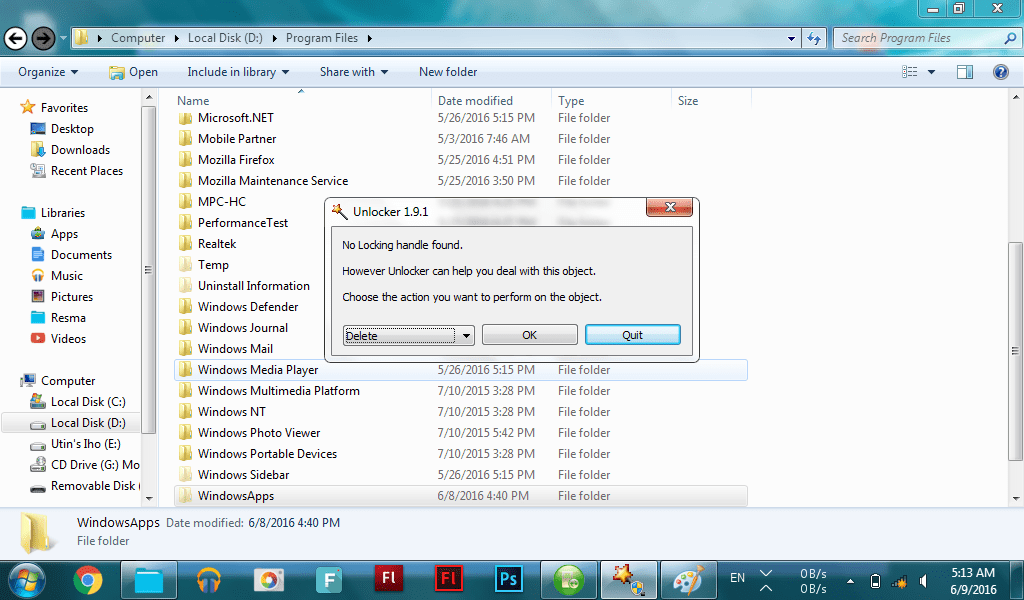
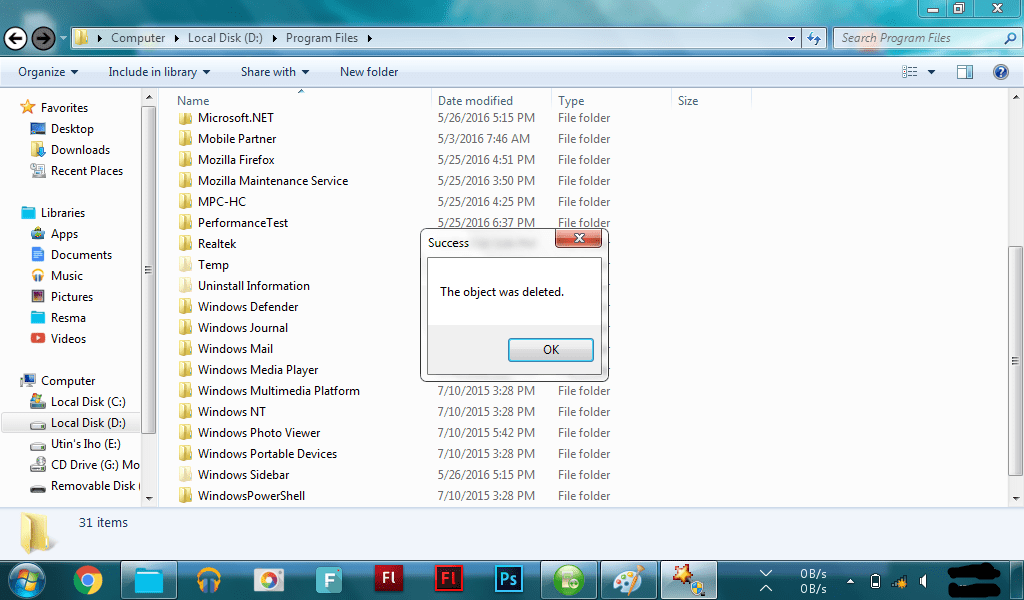
Buka folder Program Files selanjutnya Cari Folder Windows Apps selanjutnya Klik kanan, klik Unlocker selanjutnya Pilih Delete pada List selanjutnya Klik OK kita Tunggu (Memakan waktu sekitar 2-4 jam)Setelah sudah akan muncul window The Object Was Deleted.


 4. Lakukan hal yang sama seperti Cara 3, tetapi sekarang hapus folder yang berada di Drive Windows 10:\Windows\System Apps. Hapus folder System Apps tersebut yang terdapat di directory Windows dengan Unlocker(waktu 10-30 menit).
5. Restart dan masuklah ke Windows 10
Installah Grapich Driver sesuai dengan yang ada pada devices. Saya anjurkan gunakanlah driver modder, seperti GMA 3600 driver modder yang sudah terdapat OpenGL 3.0
 6. Selamat kamu berhasil menginstall Windows 10

**_NB: Lama waktu delete tergantung Processor. Tujuan Menghapus Folder Windows Apps dan System Apps adalah agar tidak terjadi BSOD, karena driver tidak mendukung dengan Apps tersebut. Untuk pengganti UWP bisa menggunakan Bluestack sebagai penjalan aplikasi Android_**

Screenshot:


Sekian dari saya semoga bermanfaat.
Wassalamu'alaikum Wr Wb.

Selasa, 19 April 2016

Windows 10 Redstone 14267

Windows 10 Redstone 14267

Windows 10 Redstone 14267 Single Language Overview
Here it is, the new Windows 10 Redstone Build 14267 Single Language is released. Microsoft has accomplished another milestone when they developed Windows 10. Many of the users gave positive response to Windows 10 unlike Windows 8 which was met with mixed reviews. Windows 10 provided the users a huge number of benefits and features which made their everyday work very easy. You can also download Windows 10 All in One Multiple Editions ISO.


With this new build you will get a Single Language version of Windows 10 which will be English by default. This helps the users a lot as many of the users don’t bother changing the language of Windows OS. There are many developments in this version of Windows 10. Now Cortana will serve the users with a dedicated button for Music Search on top. It will allow the users to search their favorite music in the PC. Apart from this you will also get a number of new improvements in the Microsoft Edge. You can now easily clear the History in Microsoft Edge after every time you close it. The Skype also has a number of modifications such as you now attach photos in it. With new improvements, additions and some fixes this new build serves every purpose more efficiently. You can also download Windows 10 Enterprise Redstone Build 11082.


Features of Windows 10 Redstone 14267 Single Language ISO
Below are some noticeable features which you’ll experience after Windows 10 Redstone 14267 Single Language ISO free download.

Get single language version of Windows 10.
Can search for your favorite music easily.
Got new features in Microsoft Edge.
Can clear browsing history.
Lots of modifications in Skype.


Windows 10 Redstone 14267 Single Language ISO Technical Setup Details
Software Full Name: Windows 10 Redstone 14267 Single Language ISO x86 x64
32 Bit Name: 14267.1000.160213-0213.RS1_RELEASE_CLIENTSINGLELANGUAGE_OEM_X86FRE_EN-US.ISO
64 Bit Name: 14267.1000.160213-0213.RS1_RELEASE_CLIENTSINGLELANGUAGE_OEM_X64FRE_EN-US.ISO
Full Setup Size: 2.3 GB, 3 GB
Setup Type: Offline Installer / Full Standalone Setup
Compatibility Architecture: 32 Bit (x86) / 64 Bit (x64)
Latest Version Release Added On: 22th Feb 2016
License: Free Trial
Developers: Windows Homepage
System Requirements For Windows 10 Redstone 14267 Single Language ISO
Before you start Windows 10 Redstone 14267 Single Language ISO free download, make sure your PC meets minimum system requirements.

Memory (RAM): 1 GB of RAM required.
Hard Disk Space: 16 GB of free space required.
Processor: 1 GHz processor or later.
Windows 10 Redstone 14267 Single Language ISO x86 x64 Download
Click on below button to start Windows 10 Redstone 14267 Single Language ISO Free Download. This is complete offline installer and standalone setup for Windows 10 Redstone 14267 Single Language ISO. This would be compatible with both 32 bit and 64 bit windows.

32 Bit


64  bit

Jumat, 18 Desember 2015

Windows 10 Pro Redstone Build 11082 x64 ISO

Windows 10 Pro Redstone Build 11082 x64 ISO

Windows 10 Pro Redstone Build 11082 x64 ISO Overview

Microsoft has just released its first Redstone build for Windows 10 which though has not got any new noticeable features but yes it has got some under the hood changes which may come in handy for the user in the future. You can also download
Windows 10 Pro Redstone Build 11082 x64 ISO Free Download
Microsoft is focusing mainly on product improvement based on the feedback. OneCore which is the shared core of Windows across all the devices have been enhanced greatly. The Insider Hub has finally been brought back which users were demanding to be back. Known issues for the builds will now be published in the Insider Hub rather than in the Companion blog post. With this build the performance of your Windows Operating System has been improved and lots of bugs have been fixed. In this build the developers have focused on the feedback which they received from November update and we can expect huge changes in the future versions of RedStone. You can also download Windows 10 Pro Build 10051 ISO.
Windows 10 Pro Redstone Build 11082 x64 ISO Direct Link Download

Features of Windows 10 Pro Redstone Build 11082 x64 ISO

Below are some noticeable features which you’ll experience after Windows 10 Pro Redstone Build 11082 x64 ISO free download.
  • First Redstone build for Windows 10.
  • Lots of under the hood changes being made.
  • Enhanced OneCore feature.
  • Insider Hub has been brought back.
  • Lots of bugs have been fixed.
  • Enhanced performance.
Windows 10 Pro Redstone Build 11082 x64 ISO Offline Installer Download

Windows 10 Pro Redstone Build 11082 x64 ISO Technical Setup Details

  • Software Full Name: Windows 10 Pro Redstone Build 11082 x64 ISO
  • Setup File Name: Windows_10_Pro_Redstone_X64FRE_EN-US.ISO
  • Full Setup Size: 2.9 GB
  • Setup Type: Offline Installer / Full Standalone Setup
  • Compatibility Architecture: 64 Bit (x64)
  • Latest Version Release Added On: 18th Dec 2015
  • License: Free Trial
  • Developers: Windows 10 Pro Redstone Homepage
Windows 10 Pro Redstone Build 11082 x64 ISO Latest Version Download

System Requirements For Windows 10 Pro Redstone Build 11082 x64 ISO

Before you start Windows 10 Pro Redstone Build 11082 x64 ISO free download, make sure your PC meets minimum system requirements.
  • Memory (RAM): 1GB of RAM required.
  • Hard Disk Space: 16GB of free space required.
  • Processor: 1GHz processor or later

Download Now

Selasa, 25 Agustus 2015

10 Fitur Tersembunyi Windows 10

10 Fitur Tersembunyi Windows 10

Fitur Tersembunyi:

#1 – Background Scroll

Background scrolling adalah fitur dimana Microsoft akan menerapkannya di Windows 8, tapi sayang itu tidak mereka lakukan. Pada versi Windows sebelum-sebelumnya, kamu hanya bisa melakukan scroll saat Window aktif saja. Sekarang kamu bisa scroll Window bahkan jika Window itu tidak aktif.
Inilah 10 Fitur Tersembunyi Windows 10
Pada Windows 10 ada pengaturan dimana kamu bisa melakukan scroll pada Window yang tidak aktif. Pergi ke Settings, pilih Devices dan klik Mouse & touchpad. Disini kamu akan melihat pengaturan “Scroll inactive windows when I hover over them.”

#2 – Permonitor Dapat Diubah Ukurannya

Inilah 10 Fitur Tersembunyi Windows 10
Sekarang kita bisa menikmati monitor dengan resolusi tinggi 1440p, sedangkan monitor 4K saat ini harganya sudah terjangkau. Pada keadaan tertentu, khususnya monitor 4K, kamu harus mengatur display scalling sehingga teks masih bisa dibaca dengan nyaman pada jarak pandang tertentu. Di versi Windows sebelumnya, kamu bisa mengaktifkan satu scaling level untuk semua monitor, yang tentu akan mengganggu jika kamu memiliki banyak monitor dengan resolusi berbeda.
Beruntung Microsoft menyadari kelemahan ini di Windows 10 dengan memperbarui pengaturan scalling. Pada Windows 10, pengaturan display scalling bisa kamu ubah pada setiap monitor. Jadi jika kamu menggunakan dua monitor, 4K dan 1080p, ini akan mempermudah kamu dalam mengatur tampilan dua monitor.
Kemampuan untuk mengatur display scalling terpisah untuk setiap monitor juga berguna jika kamu menghubungkan layar laptop ke device external. Windows 10 bisa mempertahankan untuk tampilan laptop dan juga untuk tampilan device external.

3# – Storage Sense

Inilah 10 Fitur Tersembunyi Windows 10
Storage Sense adalah salah satu fitur yang paling terlihat di Windows 10, berasalan dari platform mobile Microsoft. Fitur ini bisa menganalisa file di hardisk kamu, menampilkan berapa banyak space yang telah kamu gunakan dan sisa dari space hardisk kamu. Diolah lagi dengan dibagi menjadi beberapa kategori. Selain itu Storage sense juga bisa membaca drive external yang terpasang melalui USB.
Melihat Storage Sense dalam beberapa saat adalah cara yang bagus untuk mengelolah file pada drive kamu. Cara ini akan mempermudah kamu untuk membersihkan file yang tidak dibutuhkan, memberitahukan berapa banyak space hardisk ditempati oleh masing-masing aplikasi, game, music, videos, pictures dan documents yang diinstall ke dalam sistem.

#4 – Command Prompt dengan Perombakan Besarnya

Inilah 10 Fitur Tersembunyi Windows 10
Command Prompt memang fitur Windows yang jarang digunakan oleh semua orang, tapi Microsoft saat ini melakukan perombakan besar. Windows 10 membawa perubahan besar, membawa perbaikan yang mempermudah user untuk memasukan dan mengedit command.
Jika kamu melakukan disable pada legacy console di Command Prompt, maka kamu bisa mengakses fitur baru seperti dukungan copy paste pada clipboard, line wrapping untuk mempermudah membaca command, mempermudah ukuran window, dan bahkan kemampuan untuk membuat window Command Prompt terlihat transparan.

#5 – Ada Tracpad Gesture yang Baru

Inilah 10 Fitur Tersembunyi Windows 10
Menurut Sejarah, Mac OS X memiliki dukungan trackpad yang lebih baik dari Windows, tapi dengan adanya Windows 10 ada upaya dari Microsoft meningkatkan kemampuan ini bagi pengguna laptop. Jadi dukungan trackpad saat ini sudah lebih baik dari sebelumnya, termasuk adanya beberapa gesture dan fungsi baru.
Windows 10 mendukung trackpad gesture yang sebelumnya mungkin sudah kamu gunakan, seperti; pinch-to-zoom, two-finger scrolling, dan two-finger tap to right click. Tapi beberapa gesture baru terbaik dirancang untuk power user dan multi-tasking. Three-finger swiping ke atas bisa membuka Task View, sehingga dapat mempermudah kamu beralih ke desktop baru. Three-finger swiping ke kiri atau kanan membuka Alt+Tab, sementara Three-finger swiping ke bawah akan membuka desktop. Microsoft juga menambahkan trakcpad shortcut seperti; three-finger tapping untuk membuka Cortana, dan four-finger tapping untuk membuka Action Center.

#6 – Mengolah Web Page di Microsoft Edge

Inilah 10 Fitur Tersembunyi Windows 10
Browser terbaru Microsoft, Edge, membawa perubahan yang besar untuk tidak sekedar upgrade dari Internet Explorer. Ada salah satu fitur keren yang membuat Edge berbeda dengan browser lainnya, kemampuan untuk mengolah web page dari dalam browser itu sendiri, kamu bisa membuat catatan berdasarkan web page dan ini adalah langkah bagus untuk pengguna device touchscreen.
Untuk mengolah web page, klik tombol Web Note di toolbar Edge. Dengan begini browser akan mengambil screenshot dari web page dan memungkinkan kamu untuk mencorat-coret, crop atau add text note ke gambar tersebut. Dengan integrasi OneDrive, menayimpan dan menyusun catatan akan menjadi lebih mudah.

#7 – Dukungan FLAC, MKV dan HEVC

Inilah 10 Fitur Tersembunyi Windows 10
Windows Media Player adalah salah satu media player populer dan efisien, lebih hemat baterai, dan memiliki lebih banyak suara sebagai alternatif aplikasi VLC. Karena adanya Windows 10, bagus Microsoft menambahkan dukungan format yang lebih banyak.
Penambahan format paling besar adalah dukungan Matroska (MKV), yang digunakan sebagian besar video H.264 dan dapat digunakan untuk multiple audio, video dan subtitle stream. Windows 10 juga mendukung audio FLAC untuk audio lossles, serta video compression HEVC/H.265. Dukungan HEVC juga telah ditambahkan untuk mengadopsi video 4K.

#8 – Funsi Baru Snapping Window

Inilah 10 Fitur Tersembunyi Windows 10
Salah satu fitur paling berpengaruh di Windows 7 adalah kemampuan untuk snapping window, mempermudah kamu untuk mengatur window yang terbuka. Windows 10 memiliki fungsi baru dalam hal snapping, semakin mempermudah pengguna berlayar besar.
Seiring dengan kemampuan untuk snap setengah layar, Windows 10 dapat snap window ke salah satu sudut layar, sehingga dapat dengan mudah mengatur empat sudut dengan empat window. Jika kamu memiliki monitor 4K, fitur ini jelas sangat berguna. Selain itu bagi pengguna multi monitor, kamu bisa melakukan snap ke sudut monitor mana pun.

#9 – Rekam Video Dimanapun

Inilah 10 Fitur Tersembunyi Windows 10
Fitur Game DVR adalah salah satu fitur Xbox di Windows 10, berguna untuk merekam saat bermain game. Bagaimana pun, kamu bisa memanfaatkan fitur ini tidak hanya untuk bermain game saja, tapi kamu bisa merekam video untuk semua aplikasi.
Untuk melakukan ini kamu perlu membuka aplikasi Xbox dan membiarkannya tetap terbuka, kemudian pindah ke aplikasi yang ingin kamu rekam. Dari sini tekan Win+G untuk membuka Game Bar, kemudian klik “Yes, this is a game.” Setelah game bar terbuka, kamu bisa merekam video dengan mudah dengan mengklik Start Recording.
Cukup bodoh memang Windows 10 tidak bisa mengenali perbedaan antara game dan aplikasi, tapi ada beberapa saat dimana aplikasi bisa mengenalinya dan kamu tidak bisa merekamnya.

#10 – DirectX 12

Mungkin fitur tersembunyi paling utama di dalam Windows 10 adalah DirectX 12. Mungkin kamu tidak akan melihat manfaat dari DirectX 12 dalam waktu dekat, tapi dalam beberapa bulan ke depan atau tahun depan, ini akan meningkatkan kinerja gaming.
Inilah 10 Fitur Tersembunyi Windows 10
Developer bisa mendapatkan lebih banyak informasi hardware dari sistem kamu, baik pada CPU dan GPU, dukungan untuk multiple GPU, lebih banyak kontrol hardware, memory pooling, dan sebagainya. Dikombinasikan dengan grafik efek baru di DirectX 12, developer dan membuat generasi terbaru game dengan memanfaatkan DX12.